


Plantronics CS55 Wireless Headset System
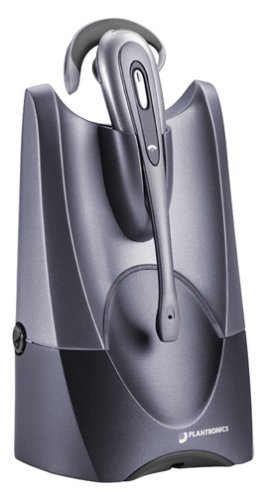
Our CS55 wireless headset system pairs a lightweight convertible headset with a desk base that connects to any standard desk phone. You get the freedom to walk up to 300 feet from your desk while staying on a call, with DECT 6.0 technology delivering interference-free audio even in crowded office environments.
The convertible wearing style lets you switch between over-the-ear and over-the-head configurations in seconds, so you can choose the fit that works best for long call days. We designed the CS55 for professionals who spend hours on desk phone calls and need reliable wireless range without sacrificing voice clarity.
CS55 system components & specs
DECT 6.0 wireless technology & range
The CS55 uses DECT 6.0 wireless protocol, which operates on a dedicated frequency band separate from Wi-Fi and Bluetooth networks. This eliminates the audio dropouts and static you might hear with older 900 MHz or 2.4 GHz headsets in busy office environments.
You get up to 300 feet of range in typical office settings, which means you can walk to a colleague’s desk, grab a file from the printer, or step into a supply room without dropping your call. The base station maintains a stable connection through standard office walls and cubicle partitions. We’ve found most users experience reliable performance within a 150-200 foot radius in real-world multi-floor office layouts.
Convertible wearing styles for all-day comfort
The CS55 ships with both over-the-ear and over-the-head wearing configurations in the box. The over-the-ear option uses a soft foam earpiece cushion and a flexible ear loop that sits behind your ear, keeping the headset secure without any headband pressure.
If you prefer a traditional headband fit, snap on the included over-the-head assembly in under a minute. The padded headband distributes weight evenly, and the rotating microphone boom lets you position it on either your left or right side. Many users who wear glasses all day choose the over-the-head style to avoid any ear-hook interference with frames.
Desk phone compatibility & installation
Connecting to your desk phone
The CS55 base connects to the headset port on most desk phones using the included phone cable. If your desk phone doesn’t have a dedicated headset port, you can use the handset-lifter accessory (sold separately) to answer and end calls remotely when you’re away from your desk.
The system works with analog desk phone lines from all major providers. We’ve tested compatibility with Cisco, Avaya, Nortel, Polycom, and Yealink desk phones. You’ll need to verify your specific phone model has either a dedicated headset port or a compatible handset jack before ordering.
Other wireless headsets in the CS lineup


Rated 4.8 by verified buyers
Common questions about the CS55
The CS55 is designed for analog desk phone systems. It connects to the headset port or handset jack on traditional desk phones that use standard telephone lines.
If you’re using a VoIP desk phone with a physical handset and headset port, the CS55 may work depending on your specific phone model. We recommend checking with your VoIP provider or phone manufacturer to confirm compatibility. For dedicated VoIP or softphone use, you might need a USB headset model instead of the CS55.
The CS55 provides up to 300 feet of wireless range in open office environments. Real-world range depends on your building layout and the materials in your walls and furniture.
Most users experience reliable performance within 150 to 200 feet when moving through typical office spaces with drywall partitions and cubicle dividers. Metal file cabinets, concrete walls, and elevator shafts can reduce range. You’ll hear a warning tone in the headset if you’re approaching the edge of the wireless range, giving you time to walk back toward your desk before the call drops.
Yes, the CS55 works with cordless desk phones as long as the base station of your cordless phone has a headset port. You connect the CS55 base to the cordless phone’s base station, not to the cordless handset itself.
Keep in mind you’ll have two wireless systems running simultaneously, which can sometimes cause interference depending on the frequency your cordless phone uses. If your cordless phone operates on 2.4 GHz, you may experience better results because the CS55 uses DECT 6.0 on a separate frequency band.
The CS55 system includes the wireless headset, the desktop base station with charging cradle, a rechargeable battery pre-installed in the headset, an AC power adapter for the base, a telephone connection cable, and both wearing-style accessories — the over-the-ear hook and the over-the-head headband.
You get foam ear cushions, a clothing clip to secure the headset cable, and a quick-start guide. If your desk phone doesn’t have a dedicated headset port, you’ll need to purchase the HL10 handset lifter accessory separately to enable remote call answer.
A fully charged battery delivers up to 10 hours of continuous talk time. Standby time when the headset is idle but powered on is approximately 50 hours.
Battery life can vary based on usage patterns. If you’re on active calls for eight hours straight, you’ll typically end the day with some charge remaining. The headset gives you a low-battery warning tone when about 30 minutes of talk time is left, so you can dock it for a quick charge between calls or finish your current conversation before the battery dies.
The CS55 is hearing-aid compatible and meets telecoil (T-coil) standards. If your hearing aid has a telecoil feature, you can activate it to reduce interference and improve sound clarity during calls.
Many users with hearing aids find the over-the-ear wearing style works better than the headband because it doesn’t interfere with behind-the-ear hearing aid components. We recommend testing both wearing configurations to see which provides the most comfortable fit alongside your specific hearing aid model.
Yes, the battery is user-replaceable. You can order a replacement battery directly from us and swap it in under a minute.
Open the battery door on the back of the headset speaker housing using the small release latch. Remove the old battery, insert the new one making sure the contacts align, and snap the door closed. The replacement battery model is specifically designed for the CS55 and comes pre-charged so you can use it immediately.