


Plantronics Voyager 4310 UC Wireless Headset
Our Voyager 4310 UC is a single-ear wireless headset designed for professionals who move between desk work and video calls throughout the day. It connects via Bluetooth to your mobile device and USB-A adapter to your PC simultaneously, so you never miss a call on either line.
We built this headset with SoundGuard DIGITAL technology and AI-powered noise canceling that adapts to your environment in real time. The flexible boom mic rotates 180 degrees to wear on either ear, and the cushioned leatherette ear pad is designed for all-day comfort during back-to-back meetings. Certified for Microsoft Teams, Zoom, and all leading UC platforms.
What’s included with your Voyager 4310
Dual connectivity for hybrid workdays
The Plantronics Voyager 4310 pairs with two devices at once — your computer via the included BT600 USB-A adapter and your smartphone over Bluetooth 5.1. When a mobile call comes in during a Teams meeting, the headset automatically routes audio from the active line.
We designed the pairing process to be instant: plug the adapter into any USB port, and the headset connects within seconds. No driver installation required on Windows, Mac, or Chrome OS. The same Bluetooth radio that handles your phone also works with tablets, so you can jump onto a Zoom call from your iPad without switching headsets.
Microphone technology and call clarity
Three digital MEMS microphones work together to isolate your voice and suppress background noise. Our AI noise-canceling algorithm samples your environment 6,000 times per second, filtering out keyboard clicks, HVAC hum, and nearby conversations in real time.
The flexible boom positions the primary mic capsule within 2 cm of your mouth for consistent pickup whether you wear the headset on your left or right ear. A red LED on the boom tip lights up when you mute, and Dynamic Mute Alert plays a subtle tone in your ear if you try to speak while muted — a feature we added after customer feedback on accidental mute during client calls.
Battery life and charging
A full charge delivers up to 24 hours of talk time or 20 days on standby. We include a USB-A to USB-C charging cable in the box; a 30-minute quick charge provides 8 hours of talk time when you need to top up between meetings.
The headset announces remaining talk time in your ear when you power on, and the Plantronics Hub desktop app shows battery percentage in real time. Low-battery warnings start at 10% remaining, giving you enough notice to finish your current call and recharge before the next one.
Other professional UC headsets in the Voyager family


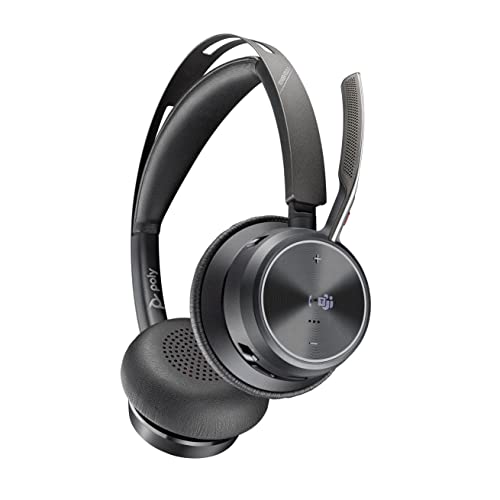

Rated 4.8 by verified buyers
Common questions about the Voyager 4310 UC
Yes. The Voyager 4310 UC is certified for both platforms and connects to your PC via the included USB-A adapter, so it works natively with any UC application running on your computer. You can join a Teams meeting, end it, and immediately jump into a Zoom call without switching settings or re-pairing the headset.
The dedicated Teams button on the ear cup launches Microsoft Teams specifically, but all call control functions (answer, mute, volume) work across Zoom, Google Meet, Webex, and other certified platforms.
A full charge provides up to 24 hours of active talk time or 20 days on standby. In real-world hybrid work scenarios, most users recharge once every 3-4 workdays depending on meeting load.
If you need a quick top-up, a 30-minute charge delivers approximately 8 hours of talk time. The headset announces remaining battery life when you power it on, and the Plantronics Hub app shows live battery percentage on your desktop.
The included BT600 adapter is USB-A, so you’ll need a USB-C to USB-A adapter or hub if your laptop only has USB-C ports. The headset itself charges via USB-C using the included cable.
Alternatively, you can pair the Voyager 4310 directly to your laptop over Bluetooth without using the USB adapter, though you’ll lose the dedicated Teams button integration and simultaneous dual-device connectivity that the adapter provides.
Yes. The boom mic rotates 180 degrees to position correctly whether you wear the headset on your left or right ear. The ear pad cushion and headband design are symmetrical, so comfort and mic placement remain consistent on either side.
When you rotate the boom to the opposite ear, the primary microphone capsule automatically adjusts to stay within 2 cm of your mouth for optimal voice pickup.
The Voyager 4310 is a monaural (single-ear) headset, while the 4320 is a stereo (dual-ear) model. Both share the same microphone technology, dual connectivity, and UC certifications.
The 4320 adds passive noise isolation with over-ear cushions on both sides, making it better suited for louder office environments or users who prefer immersive audio during calls. The 4310 is lighter and allows you to hear your surroundings, which some users prefer for situational awareness in hybrid settings.
Yes. The BT600 USB adapter works with Windows, macOS, and Chrome OS without requiring driver installation. Plug the adapter into any USB port and the headset pairs automatically within seconds.
All call control buttons, mute functionality, and firmware updates work identically across operating systems. Mac and Chromebook users can download the Plantronics Hub app for battery monitoring and advanced settings, though basic functionality works out of the box.
Yes. The Voyager 4310 uses three digital MEMS microphones with AI-powered noise canceling that samples your environment 6,000 times per second. It actively suppresses keyboard typing, HVAC noise, nearby conversations, and other ambient sounds while isolating your voice.
During testing, the noise-canceling algorithm reduced background noise by an average of 15-20 dB compared to non-AI headsets. People on the other end of your calls hear your voice clearly even if you’re working from a busy home office or shared workspace.