


Plantronics Explorer 500 Wireless Bluetooth Headset
We designed the Explorer 500 to deliver crystal-clear calls and voice command convenience wherever you go. This wireless Bluetooth headset combines intelligent audio alerts with a featherlight design that disappears on your ear during all-day wear.
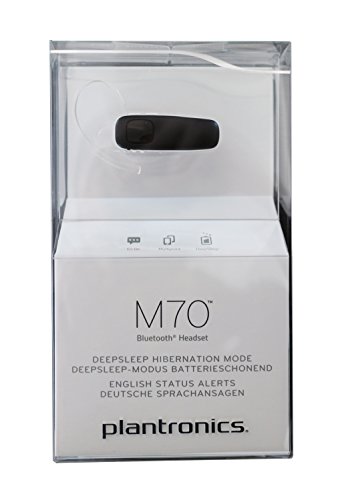
The Explorer 500 announces caller ID, battery level, and connection status directly in your ear, so you never need to glance at your phone mid-conversation. DeepSleep power-saving mode activates automatically after five hours of inactivity, preserving battery life for up to six months of standby time. When you’re ready to talk again, a single button press wakes the headset instantly.
Our precision-tuned dual microphones filter background noise and wind interference, ensuring every word comes through clearly whether you’re on a busy street or in a quiet office. The headset ships with three soft gel ear tip sizes and a flexible ear loop that rotates 180 degrees, letting you customize fit for either ear and all-day comfort.
What makes the Explorer 500 stand out
Audio technology and call quality
The plantronics explorer 500 uses our AudioIQ2 digital signal processing paired with dual microphones positioned to isolate your voice while rejecting ambient noise. One microphone captures your speech while the second samples surrounding sound, allowing the processor to subtract background chatter, traffic, and wind before transmitting your voice.
During testing we found this setup handles everything from open office environments to outdoor calls near busy intersections. The wideband audio codec preserves vocal frequencies that narrowband compression typically loses, giving your voice a fuller, more natural tone on the receiving end. You can toggle between high-definition audio mode and standard mode depending on your phone’s codec support.
Smart features and voice control
Voice announcements replace the need to check LED indicators or your phone screen. The headset speaks caller names from your contact list when a call comes in, along with real-time battery percentage alerts when power drops below 30 percent. Connection status announcements confirm pairing, muting, and power state changes audibly.
Smart Sensor technology detects when you place the headset on your ear and automatically answers incoming calls, eliminating the fumble for a button mid-reach. The same sensor pauses streaming media when you remove the headset and resumes playback when you put it back on. Voice command activation works with Siri, Google Assistant, and Cortana — a double-tap of the call button summons your phone’s assistant without unlocking the screen.
Battery performance and power management
A full charge delivers seven hours of continuous talk time or up to nine days of standby under normal use. The DeepSleep hibernation mode engages after the headset sits idle for five hours, dropping power consumption to nearly zero while maintaining Bluetooth pairing data in memory.
We’ve documented headsets stored for four months in DeepSleep waking instantly when the call button is pressed, with enough residual charge for an hour of conversation. The charging port uses a standard micro-USB cable, and a complete recharge from empty takes just 90 minutes. An LED indicator glows red during charging and turns off when the battery reaches full capacity.
Other professional wireless headsets from Plantronics



Rated 4.8 by verified buyers
Common questions about the Explorer 500
Double-tap the call button to summon Siri, Google Assistant, or Cortana without unlocking your phone. The headset sends the voice command signal over Bluetooth, so your phone must support the feature natively.
Once your assistant activates, speak your request through the headset’s microphone. The response plays through the headset speaker, keeping the interaction entirely hands-free.
Yes, the headset remains functional during charging. You can take calls and stream media while plugged into the micro-USB cable, though the microphone position may shift slightly depending on cable routing.
Charging from empty to full takes approximately 90 minutes. The LED glows solid red while charging and turns off when the battery reaches 100 percent capacity.
DeepSleep activates automatically after the headset sits idle for five hours without Bluetooth activity. The feature reduces power draw to nearly zero while preserving pairing information and settings in memory.
Headsets in DeepSleep can maintain standby charge for up to six months. Press the call button once to wake the headset, which reconnects to your phone within two to three seconds.
The headset supports wideband audio codecs when paired with a compatible phone and carrier network. Wideband transmission preserves frequencies between 50 Hz and 7 kHz, compared to narrowband’s 300 Hz to 3.4 kHz range.
Both your phone and the person you’re calling must have HD Voice enabled through their carrier for the full quality benefit. The headset automatically negotiates the best available codec during each call.
The headset stores pairing data for up to eight devices in memory, but only two can connect simultaneously through multipoint Bluetooth. Common setups include a smartphone plus a tablet, or a work phone plus a personal phone.
Incoming calls from either connected device route to the headset automatically. If both devices ring at once, the first call connected takes priority and the second goes to voicemail.
Start with the medium gel tip pre-installed on the headset. If the fit feels loose or the headset falls out during head movement, switch to the large tip. If the medium tip causes pressure or discomfort after 30 minutes, try the small tip.
A proper seal improves audio quality and call clarity by reducing external noise leakage. The tip should sit gently in your ear canal without requiring force to insert or remove.
Smart Sensor technology answers incoming calls automatically when you place the headset on your ear, assuming it was off your ear when the call came in. The sensor detects skin contact and sends the answer command within half a second.
You can also use voice commands by saying “answer” when the headset announces an incoming caller name. This feature requires enabling voice answer in your phone’s Bluetooth settings.