

Plantronics WH500 Wireless Headset | Professional Audio & All-Day Comfort
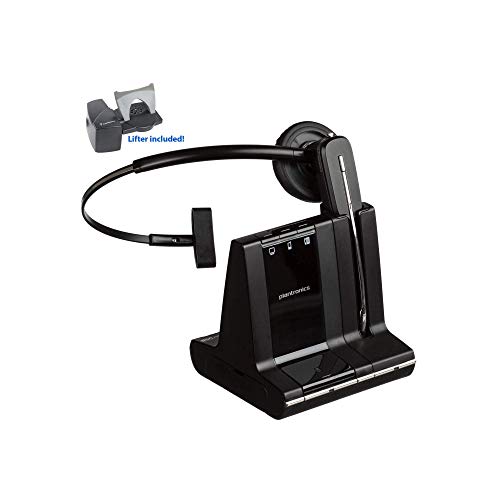
Our WH500 wireless headset brings professional-grade audio to the modern workplace. Engineered for contact center agents, remote workers, and anyone who spends hours on calls each day, this model combines DECT 6.0 wireless technology with a noise-canceling microphone to ensure every conversation is heard clearly.
The over-the-head design distributes weight evenly across a padded headband, while ultra-soft leatherette ear cushions create a seal that reduces background noise without feeling restrictive. We built the WH500 to deliver up to 10 hours of continuous talk time on a single charge, so you can move through your workday without tethering yourself to a charging dock. The base station pairs instantly with your desk phone, and the 300-foot roaming range gives you the freedom to step away from your desk while staying connected.
WH500 Technical Specifications
Wireless Freedom & Connectivity
The plantronics wh500 uses DECT 6.0 wireless protocol to maintain a stable, interference-free connection across a 300-foot range. Unlike Bluetooth headsets that struggle in crowded office environments, DECT operates on a dedicated frequency band that won’t compete with smartphones, Wi-Fi routers, or microwave ovens.
The included base station connects directly to your desk phone’s headset port using a standard RJ9 cable. Once paired, the headset remembers the base and reconnects automatically each time you power it on. The roaming range is particularly useful in open-plan offices — you can walk to the printer, step into a quiet room, or grab a coffee without dropping the call. We’ve designed the WH500 to integrate seamlessly into desk phone systems from Cisco, Avaya, Polycom, and most major manufacturers.
Battery Life & Charging
Our 10-hour lithium-ion battery provides enough power for a full shift of back-to-back calls. The headset recharges via a magnetic docking cradle that snaps into place with one hand — no fumbling with USB cables or alignment pins. A full charge takes approximately 3 hours, and the LED indicator on the base glows amber during charging, then switches to green when complete.
Power Management
The WH500 enters standby mode automatically after 30 seconds of inactivity to conserve battery. When you’re ready to take a call, simply press the call-answer button and the headset wakes instantly. The low-battery warning tone gives you a 15-minute heads-up before the charge runs out, so you can dock the headset or wrap up your conversation without an unexpected disconnect.
Audio Quality & Noise Cancellation
Wideband audio support on the plantronics wh500 captures frequencies from 150 Hz to 6.8 kHz — nearly double the range of traditional narrowband telephony. This extended frequency response makes voices sound more natural and reduces listener fatigue during long calls. The noise-canceling boom microphone uses dual-element design to isolate your voice while suppressing keyboard clicks, nearby conversations, and HVAC hum.
We position the microphone element just 1.5 inches from your mouth to ensure consistent pickup even when you turn your head. The foam windscreen built into the mic tip blocks breath pops and reduces wind noise if you’re walking through the office. Call center managers consistently report that the WH500’s audio clarity helps agents resolve customer issues faster because they don’t have to repeat themselves or ask callers to speak up.
Other Wireless Headsets in the Plantronics Professional Series



Rated 4.8 by verified buyers
Common Questions About the WH500 Wireless Headset
The WH500 provides up to 10 hours of continuous talk time on a single charge. In typical office use — where you take calls intermittently throughout the day with breaks in between — the battery often lasts longer because the headset enters standby mode automatically during idle periods. A full recharge takes approximately 3 hours when docked on the magnetic charging base.
The DECT 6.0 wireless technology provides a roaming range of up to 300 feet from the base station in open environments. Actual range will vary depending on office layout, wall construction, and sources of interference, but most users can move freely throughout a typical office floor without losing connection. The headset will emit a warning tone if you approach the edge of the wireless range.
The WH500 is designed specifically for desk phone use and connects via the included base station that plugs into your phone's headset port. It does not have USB or Bluetooth connectivity for computer use. If you need a headset for both desk phone and PC softphone applications, consider our Savi or Voyager series models that offer multi-device connectivity.
The WH500 works with virtually all desk phones that have a standard headset port, including models from Cisco, Avaya, Polycom, Mitel, NEC, and most other major manufacturers. We include three different connector cables in the box to match the most common desk phone configurations. If you have an older phone or a proprietary system, you may need a specific adapter cable — contact our support team to verify compatibility.
The leatherette ear cushions attach via twist-lock tabs and can be replaced without tools. Rotate the cushion counterclockwise about 30 degrees, then pull gently to remove it from the speaker housing. Align the replacement cushion's tabs with the slots on the housing, press it into place, and twist clockwise to lock. Replacement cushion kits are available through our accessories page and typically cost under twenty dollars.
Yes, the WH500 includes a dedicated mute toggle button on the left earcup. Press the button once to mute your microphone — a red LED on the microphone boom will light up to confirm that mute is active. Press the button again to unmute. This allows you to silence background noise or hold private side conversations without the other party hearing you.
Each WH500 package includes the wireless headset, magnetic charging base station, AC power adapter for the base, three desk phone connector cables for different phone systems, quick-start guide, and user manual. Everything you need to start using the headset is included — you don't need to purchase any additional accessories unless you want spare ear cushions or replacement batteries down the road.