


Plantronics APP-51 Electronic Hookswitch – Seamless Call Control
The Plantronics APP-51 electronic hookswitch eliminates the need for a mechanical handset lifter by creating a direct connection between your wireless headset base and Cisco IP phone. We designed this adapter to give you remote answer/end call control right from your headset, so you can step away from your desk without sacrificing call management. The APP-51 plugs into compatible Cisco phones via the headset port and your headset base via the AUX port, creating a seamless electronic signal path.
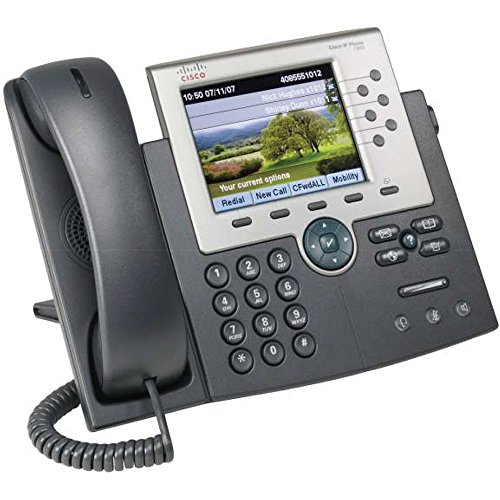
Unlike mechanical lifters that physically raise and lower the handset, our APP-51 uses an electronic interface that integrates with the phone’s internal circuitry. This means faster response times, no moving parts to wear out, and a cleaner desk setup. The adapter is compatible with a wide range of Plantronics CS-series and Savi wireless headset systems, as well as select Cisco unified IP phone models including 7940, 7941, 7942, 7945, 7960, 7961, 7962, 7965, 7970, 7971, and 7975.
Technical specifications & compatibility
How the APP-51 Works with Your Phone System
The APP-51 creates a direct electronic signal path between your Plantronics wireless headset base and your Cisco IP phone’s internal call control circuitry. When you press the multifunction button on your headset to answer or end a call, the signal travels through the headset base to the APP-51 adapter, which then communicates with the phone using Electronic Hook Switch protocol. This all happens in milliseconds, giving you the same instant response you’d get from manually lifting the handset.
Installation takes less than five minutes. Connect the RJ-9 connector from the APP-51 into your phone’s headset port (marked with a headset icon), then plug the opposite end into the AUX port on your headset base. The system auto-detects the connection and configures itself. You’ll know it’s working when you can answer an incoming call by pressing your headset button while away from your desk – no reaching back to tap the phone required.
Compatibility & Phone Model Requirements
The Plantronics APP-51 is engineered specifically for Cisco unified IP phones in the 7900 series. Confirmed compatible models include 7940, 7941, 7942, 7945, 7960, 7961, 7962, 7965, 7970, 7971, and 7975. On the headset side, the adapter works with Plantronics CS500-series (CS510, CS520, CS530, CS540), CS300-series, Savi 700-series (W710, W720, W730, W740), and W440 wireless systems.
Checking Your Phone’s Firmware
Some Cisco phone models require minimum firmware versions to support EHS functionality. Most phones shipped after 2008 include EHS support out of the box, but if your APP-51 isn’t responding to headset button presses, check your phone’s firmware version in the settings menu. Cisco firmware 8.0 or later typically includes full EHS support. Your IT administrator can update phone firmware remotely if needed.
APP-51 vs. Mechanical Handset Lifters
We often get asked whether the plantronics app-51 is worth choosing over a mechanical handset lifter like the HL10. The answer depends on your phone model and personal preference. Mechanical lifters use a small arm that physically raises and lowers your handset when you press the headset button – they’re universal and work with nearly any phone, but they add a visible gadget to your desk and rely on moving parts that can eventually wear out.
The APP-51 eliminates all moving parts by using an electronic signal instead. It’s faster (no physical motion delay), quieter, and nearly invisible once installed. The trade-off is compatibility – it only works with phones that have EHS capability built in, which is why we specifically designed it for the Cisco 7900 series. If your phone supports EHS, the APP-51 is the cleaner, more reliable solution. If you have a non-Cisco phone or an older model without EHS, you’ll need the mechanical lifter route – solutions that pair with handset lifter hardware still deliver remote answer/end functionality when an electronic hookswitch isn’t an option.
Electronic Hookswitch Adapters & Call Control Accessories



Rated 4.8 by verified buyers
Common Questions About the APP-51 Hookswitch
No, the APP-51 is engineered specifically for Cisco unified IP phones in the 7900 series (models 7940, 7941, 7942, 7945, 7960, 7961, 7962, 7965, 7970, 7971, and 7975). If you have an Avaya, Polycom, or other brand phone, Plantronics offers different EHS adapters designed for those systems – the APC-43 for Avaya and APV-63 for Polycom are common alternatives. Always confirm your phone model before ordering to ensure compatibility.
The APP-51 is designed for wireless headset systems that have a base station with an AUX port, such as the Plantronics CS500 series or Savi 700 series. Corded headsets plug directly into the phone’s headset port and don’t require an electronic hookswitch adapter, since you’re already at your desk to manually answer calls. If you’re using a corded headset, you won’t need the APP-51.
The APP-51 uses an electronic signal to control call answer and end functions, while the HL10 is a mechanical device that physically lifts your handset. The APP-51 is faster, quieter, and has no moving parts, but it only works with phones that support EHS protocol. The HL10 is universal and works with nearly any desk phone, making it a good backup option for older models or non-Cisco systems. If your phone supports EHS, the APP-51 is the cleaner solution.
No software or drivers are required. The APP-51 is a plug-and-play adapter that communicates with your phone using the built-in Electronic Hook Switch protocol. Simply connect one end to your phone’s headset port and the other to your wireless headset base’s AUX port. The system auto-detects the connection and you can start answering calls remotely within seconds.
Most Cisco 7900-series phones shipped after 2008 include EHS support, but some older firmware versions may not recognize the APP-51. Cisco firmware version 8.0 or later typically includes full EHS functionality. You can check your phone’s current firmware in the settings menu. If your firmware is outdated, contact your IT administrator to request a remote update – the process usually takes just a few minutes and enables EHS support.
The APP-51 is designed specifically for desk phone call control and does not interface with PC softphone applications like Jabber or Zoom. If you need to control softphone calls with your headset, look for wireless headset systems with built-in PC connectivity, such as the Plantronics Savi W740, which supports simultaneous desk phone and PC audio. The APP-51 only manages calls routed through your Cisco IP desk phone.
The APP-51 cable is approximately 10 inches long, which is sufficient for most desk setups where the phone and headset base sit near each other. The cable is not designed to be extended with additional couplers or extenders, as doing so can introduce signal interference or connectivity issues. If your phone and headset base are more than 10 inches apart, rearrange your desk layout or use a phone stand to bring them closer together before connecting the APP-51.