

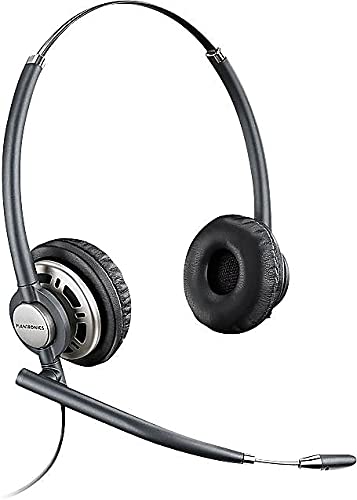
Plantronics HW720 EncorePro Headset
Our HW720 is built for professionals who spend hours on calls and need exceptional audio clarity without sacrificing comfort. The binaural over-the-head design with soft leatherette ear cushions distributes weight evenly, so you can wear it through back-to-back meetings or extended support shifts without pressure points.
We engineered the HW720 with a noise-canceling microphone that filters out background chatter and keyboard noise, ensuring your voice comes through clearly on every call. The quick disconnect feature lets you step away from your desk without removing the headset, and the durable construction withstands daily use in high-volume environments.
What makes the HW720 ideal for professional use
Audio performance and noise cancellation
The HW720 uses wideband audio technology to capture frequencies between 150 Hz and 6800 Hz, delivering richer voice reproduction than narrowband systems. You’ll hear subtle vocal nuances that help you understand accents and read emotional cues, which matters when you’re troubleshooting complex issues or building rapport with customers.
Our noise-canceling microphone sits on a flexible boom that positions precisely at the corner of your mouth. The design incorporates acoustic foam that absorbs ambient sound before it reaches the mic element, so your callers hear your voice clearly even when colleagues are talking nearby or keyboards are clacking around you. In testing, the HW720 reduces background noise by up to 75 percent compared to non-canceling microphones.
Comfort engineering for extended wear
We designed the HW720 for people who wear headsets six to eight hours daily. The leatherette ear cushions are filled with slow-recovery memory foam that molds to your ear shape, distributing contact pressure across a wider surface area than standard foam. The over-the-head metal band flexes to accommodate different head sizes without creating hotspots on the crown.
The binaural design covers both ears, which provides passive noise isolation that helps you focus in open office layouts. Each ear cup pivots independently, so the headset conforms naturally whether you’re leaning forward to type or sitting back during a long call. The cushions are replaceable when they eventually compress after months of daily use.
Quick disconnect and desk mobility
Quick Disconnect Cable
The HW720 includes a modular quick disconnect (QD) cable that separates the headset from your desk phone or audio processor with a single twist. This lets you step away to grab a file or talk to a coworker face-to-face without ending your call or removing the headset from your head. When you return, the QD reconnects instantly with an audible click.
Compatibility with Plantronics Amplifiers
The headset connects to Plantronics M-series, MX10, and Vista audio processors, which provide call control buttons and volume adjustment at your fingertips. The same metal reinforcement found in our professional wired headset lineup ensures the headband maintains its shape through hundreds of don-and-doff cycles. If your office uses a unified communications platform, the HW720 works with Plantronics DA-series USB adapters for PC-based calling.
Explore our full EncorePro wired headset collection


Rated 4.8 by verified buyers
Common questions about the HW720
The HW720 headset uses a modular quick disconnect cable system, so it requires a separate Plantronics bottom cable that matches your specific desk phone model. Plantronics manufactures more than 70 different bottom cables to support phones from Cisco, Avaya, Mitel, Polycom, Yealink, and most other major brands.
If you’re unsure which cable you need, check your phone’s make and model number, then reference the Plantronics compatibility guide or contact our support team. The bottom cable connects your phone’s headset port to the quick disconnect interface on the HW720.
Yes, but you’ll need a Plantronics USB adapter like the DA45, DA70, or DA80 to connect the HW720 to your computer. The headset itself uses an analog connection, so the USB adapter converts the signal and provides inline controls for answering, ending, and muting calls.
Once connected through a USB adapter, the HW720 works with softphone applications including Microsoft Teams, Zoom, Webex, RingCentral, and other unified communications platforms. The adapter is plug-and-play on Windows and Mac systems with no software installation required.
The ear cushions on the HW720 are designed to be user-replaceable. Gently peel the existing cushion away from the speaker housing, starting at one edge and working around the perimeter. The cushion is held in place by a plastic lip that fits into a groove on the ear cup.
To install a new cushion, align the plastic ring on the replacement cushion with the groove on the speaker housing and press firmly around the entire edge until it clicks into place. Replacement cushion kits are sold separately and typically include both left and right ear cushions plus foam windscreens for the microphone.
The HW720 is a binaural headset with ear cups that cover both ears, while the HW710 is a monaural headset with a single ear cup. The binaural design of the HW720 provides passive noise isolation that helps you focus in noisy environments and is generally more comfortable for all-day wear since weight is distributed across both ears.
The monaural HW710 leaves one ear open, which some users prefer for situational awareness in environments where they need to hear colleagues or office announcements. Both headsets share the same noise-canceling microphone, quick disconnect cable system, and metal headband construction.
The quick disconnect cable that comes with the HW720 is approximately ten inches long and runs from the headset to the QD interface. This short cable prevents tangling and keeps the connection point close to your body for easier mobility.
The bottom cable that connects the QD interface to your desk phone or audio processor is sold separately and comes in various lengths, typically ranging from six to twelve feet. Choose a cable length based on how far your phone or audio processor sits from where you’ll be working.
Yes, the microphone boom on the HW720 rotates 360 degrees and can be worn on either the left or right side depending on your preference. The boom arm is flexible and holds its position once adjusted, so you can place the microphone precisely at the corner of your mouth for optimal voice pickup.
The boom includes a reinforced hinge that resists drooping over time, even with daily adjustments. For best noise-canceling performance, position the microphone approximately one finger-width from the corner of your mouth, angled slightly toward your lips rather than directly in front of your mouth.
Yes, the HW720 is suitable for shared-desk environments or call centers with multiple shifts. The leatherette ear cushions can be wiped down with a damp cloth and mild disinfectant between users. The adjustable headband accommodates different head sizes, and the quick disconnect system makes it easy for users to swap the headset between workstations.
For hygiene purposes in high-turnover environments, consider keeping replacement ear cushions and microphone windscreens on hand. Replace cushions every six to twelve months depending on usage intensity, and swap windscreens every three to six months to maintain both hygiene and noise-canceling performance.