


Plantronics BT600 Bluetooth USB Adapter
The BT600 is our universal Bluetooth USB adapter designed to pair with any Plantronics Bluetooth headset. Plug it into your computer’s USB port and enjoy wireless communication up to 30 meters away from your desk.
We built the BT600 for professionals who need reliable wireless connectivity without wrestling with built-in Bluetooth drivers. It works with Windows, Mac, and Linux systems right out of the box. The adapter connects instantly to your existing Plantronics headset and eliminates the audio latency and dropout issues common with standard computer Bluetooth.
Whether you’re in back-to-back video calls or managing a contact center queue, the BT600 delivers consistent performance. Our Class 1 Bluetooth technology maintains a stable connection even when you step away from your workstation to grab files or consult with a colleague.
Technical specifications
Installation and setup
We designed the BT600 for zero-friction deployment. Insert the adapter into any available USB port on your computer — Windows and macOS recognize it immediately without manual driver downloads. The LED on the adapter glows solid white once the system detects it.
Put your Plantronics headset into pairing mode by holding the call button for five to six seconds until the LED flashes red and blue. The BT600 automatically discovers your headset within seconds and completes the pairing. Once paired, the adapter remembers your headset and reconnects every time you power it on.
Range and signal quality
The plantronics bt600 uses Class 1 Bluetooth to deliver up to 30 meters of range in open environments. In typical office settings with cubicle walls and furniture, expect consistent connectivity within 15 to 20 meters of your desk.
We chose Class 1 specifically to handle the interference common in modern offices — Wi-Fi routers, microwave ovens, and overlapping Bluetooth peripherals all compete for the 2.4 GHz band. The BT600’s higher transmit power and adaptive frequency hopping maintain a stable link even when a dozen colleagues are on wireless headsets nearby.
Compatibility across devices
Headset compatibility
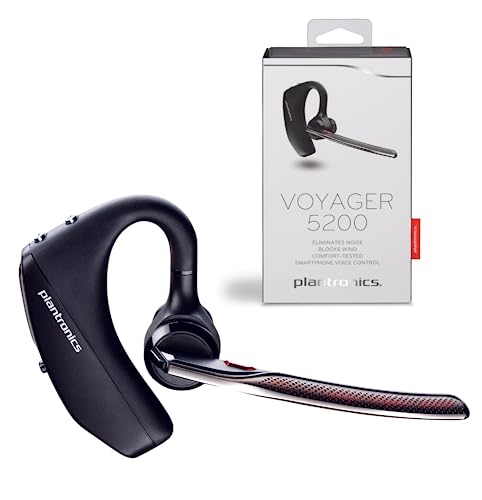
The BT600 pairs with every Plantronics Bluetooth headset we manufacture — Voyager series, Savi wireless models, BackBeat office headsets, and legacy devices dating back several years. If your headset supports Bluetooth, the BT600 connects to it.
Operating system support
Windows 7 through Windows 11 recognize the adapter as a standard audio device the moment you plug it in. macOS 10.10 and later versions also provide native support without configuration. Linux distributions using kernel 3.10 or newer load the appropriate Bluetooth stack automatically.
Bluetooth connectivity for every workspace


Rated 4.8 by verified buyers
Common questions about the BT600 adapter
The BT600 is engineered specifically for Plantronics Bluetooth headsets to ensure optimal audio quality and feature support. While some third-party Bluetooth devices may connect, we cannot guarantee full functionality or the same performance standards.
For the best experience and to access features like firmware updates and voice prompts, we recommend pairing the BT600 exclusively with Plantronics headsets.
The BT600 supports one active connection at a time. If you need to switch between headsets, put the first headset out of range or power it off, then pair the second headset following the standard pairing procedure.
For environments where multiple users share one workstation across shifts, each user can pair their personal headset to the same BT600. The adapter remembers the pairing and reconnects to whichever headset is powered on first.
Most laptops use Class 2 Bluetooth with a maximum range of about 10 meters and lower transmit power. The BT600 uses Class 1 Bluetooth with up to 30 meters of range and stronger signal penetration through walls and office furniture.
Additionally, the BT600 is optimized for voice applications with lower latency than generic laptop Bluetooth stacks. This translates to fewer audio drop-outs and better synchronization during video calls.
Yes, the BT600 functions normally when plugged into a USB port on a docking station. The adapter communicates with the operating system through the dock’s USB hub just as it would through a native laptop port.
If your docking station has both front and rear USB ports, either location works equally well. The adapter’s compact design ensures it will not block adjacent ports regardless of placement.
The LED on the BT600 glows solid white when a headset is connected and actively paired. During the initial pairing process, the LED may blink as it searches for your headset.
Your Plantronics headset will also provide an audio prompt confirming the connection once pairing completes. If the LED on the BT600 remains off, check that it is fully inserted into the USB port and that your operating system recognizes it as an audio device.
The BT600 integrates seamlessly with unified communications platforms including Microsoft Teams, Zoom, Cisco Jabber, Skype for Business, and other VoIP applications. The adapter presents itself as a standard USB audio device, so any softphone that supports USB headsets will recognize it.
Call controls on your Plantronics headset — answer, end, mute — function normally within these applications without additional configuration. Simply select the BT600 as your default audio device in the softphone’s settings menu.
No, the BT600 draws power directly from the USB port and does not contain a battery. As long as your computer is powered on and the adapter remains connected, it stays active and ready to pair.
Your Plantronics Bluetooth headset has its own rechargeable battery, but the BT600 itself requires no charging or battery maintenance.